A practical guide to MacFamilyTree, family websites and using a Mac mini to keep your archive at home.
A family archive might begin with a photograph whose names are missing, a grandparent’s recollection or a certificate found in a drawer. Before long, it contains names, dates, letters, recordings and questions you still need to answer. The challenge becomes keeping those materials organised, available and safe enough to pass on.
For Mac users, MacFamilyTree 11 is one way to build that archive on your own computer and turn selected research into a family website. An older Mac mini can hold the archive and serve the exported website to family members, provided its hardware and operating system are suitable. You can also combine them: keep the master archive locally and pay for historical-record searches only when you need them. The right choice depends on what you want to preserve, how often you research and whether someone can maintain the equipment.
MacFamilyTree: the main program in this guide
MacFamilyTree 11, by Synium Software, is available in the Mac App Store. It stores your tree locally unless you choose a sharing or cloud option. MobileFamilyTree for iPhone and iPad is a separate purchase. You can therefore begin with one Mac, without taking out a genealogy-software subscription.
Features that make a family archive useful
- Records with context. Link photographs, video, audio and PDFs to people, families, places, sources and events. Instead of keeping a portrait in an unnamed folder, connect it to the person it depicts and add what you know about its origin.
- Evidence and research tasks. Source templates, to-dos and plausibility checks help organise citations and flag potential inconsistencies. Use a warning as a reason to check a record, not as proof that the software knows the correct answer.
- Portable data. GEDCOM import and export support exchanging tree information with other programs. Keep a native MacFamilyTree backup as well; test that a transfer preserves the details and media you need.
These capabilities are documented in Synium’s technical feature list.
Charts include fan, ancestor, relationship and timeline views. Person, family and narrative reports can present the research in a form relatives will actually read. Place tools, maps and a virtual globe help connect events geographically. For a family gathering, try a short report about one person alongside a chart showing their immediate relatives, rather than presenting the entire database. See the chart and report options.
The app also offers photo colourisation and enhancement. Treat altered images as interpretations and preserve the original scan. Synium describes server-based AI processing, so those functions should not be presented as fully offline. If your aim is to keep photographs entirely on your own equipment, avoid those online processing features. The ordinary local archive and the optional online tools are different choices.
If you already use MacFamilyTree 10, retain a native backup before opening the tree in version 11, which converts it to the newer format. If the tree is not detected, Synium recommends exporting a MacFamilyTree file from the old version and opening that file in the new one. Migration guidance.
Website creation is built in
MacFamilyTree 11 exports static website files with themes, search and language switching. Static hosting does not require a genealogy database or PHP application. You can serve the exported files from your own equipment or a compatible web host. Synium documents the redesigned website export here.
Think of the export as a published edition of your tree. Edit the master in MacFamilyTree, generate a new export and replace the older website when you want visitors to see the changes. Do not assume a relative’s browser can edit the master database through this static website.
Three sharing choices, with different storage locations
- Your own website files: export to your own hosting arrangement. For a home-server approach, keep the files on the Mac mini and control how visitors connect.
- MacFamilyTree.com: Synium offers free optional hosting with password protection. This is convenient, but it uploads the published information to a third-party service.
- CloudTree: optional sync and collaboration use Apple’s iCloud infrastructure. Invited participants can work together with compatible apps, while local copies remain available offline. It is not an exclusively at-home storage arrangement.
Web export lets you exclude living or private people and choose which media to include. Review those selections before every export. These sharing options are explained in Synium’s Sync & Share guide. Website browsing and collaborative editing are separate needs; choose the option that matches your family’s purpose.
First, separate three different jobs
- Research: finding evidence in censuses, registers, newspapers and archives.
- Preservation: retaining your tree, source citations, photographs and recordings.
- Sharing: letting relatives browse, suggest corrections or contribute memories.
A desktop program helps organise what you already know. A records subscription helps find material you do not yet have. A family website makes selected material easier to share. Buying one does not automatically give you the other two.
Ancestry, for example, lets free registered users create, edit and share family trees. Its paid memberships principally expand access to records and other features. You do not have to keep a paid subscription simply to retain your tree there. However, most subscription records, including records attached to your tree, become unavailable to view after the membership ends unless they are free or you have already downloaded them. Ancestry explains its free account access here.
What the software and subscriptions cost
Prices checked against official product pages on 1 October 2026. All figures below are in US dollars, before any applicable tax. Prices, offers and availability can vary by country and change over time; confirm the checkout total and renewal terms. These are software and membership charges, not complete home-server costs.
Synium lists MacFamilyTree 11 at a regular $69.99, with a limited-time $34.99 new-customer offer currently shown on the US App Store. Its direct upgrade route currently lists $24.99 for eligible previous-version owners. That upgrade uses Synium’s downloadable app and purchase process; do not assume the App Store automatically applies it. MobileFamilyTree is sold separately. Check local-store currency, taxes, eligibility and the offer at checkout. Official purchase and upgrade guidance.
The calculations below use the regular $69.99 price, so the result does not depend on a temporary sale. A purchase covers that major version. Synium says it normally releases paid major upgrades about every three years, with free updates between them; future upgrades are not included forever. See the developer’s update FAQ.
MacFamilyTree pricing and other tools
| Option | Listed price | What you are buying |
|---|---|---|
| MacFamilyTree 11 | $69.99 regular price; $34.99 limited-time new-customer offer currently shown | Mac genealogy software with built-in website export. Optional cloud services are separate choices. |
| RootsMagic 11 | $39.95 new download licence; $29.95 upgrade for previous-version owners | Desktop family-tree software for Windows and Mac, with no software subscription. |
| Family Historian 7 | $64.95 download | A perpetual single-user Windows licence; up to two simultaneous personal installations. Internet is required for installation and activation. |
| The Next Generation of Genealogy Sitebuilding (TNG 15) | $36.99 new licence | Software for a family-history website you host yourself. Hosting and server equipment are separate. |
| Gramps | $0 | Free, open-source desktop genealogy software. |
| webtrees | $0 software licence | Free, open-source family-history website software for your own server. |
For readers considering the other options, RootsMagic plus TNG currently totals $76.94 in new download licences. They are separate products; transferring a GEDCOM file is not automatic two-way synchronisation. You can also use TNG on its own, entering and maintaining your tree through its administration pages. MacFamilyTree’s own static website export does not require either product.
“One-time purchase” covers the purchased version. It does not promise every future major version, perpetual compatibility with new operating systems or free hardware replacement. TNG includes minor updates without charge but may charge for major upgrades. Read the licence before using multiple website installations. TNG’s feature and update information and licensing FAQ explain these limits.
How the other programs compare for sharing
- RootsMagic: its publishing tools include charts, reports and MyRootsMagic websites. MyRootsMagic is hosted online, so it is a different storage arrangement from a website on your Mac mini. RootsMagic publishing guide.
- Family Historian: its Windows website wizard generates files that you can preview locally, export and place on a web server. It is another example of maintaining a desktop tree and publishing a separate website edition. Family Historian website guide.
- Gramps: website reports can generate browsable pages, and the Dynamic Web add-on provides an interactive tree and searchable indexes. Check compatibility and privacy options before using an add-on. Gramps Dynamic Web documentation.
- TNG and webtrees: these are server applications for maintaining and browsing a database through a website. They suit families who need accounts and contributions through the browser, but require more server administration than a static export.
Choose by the workflow you need: a readable website edition, a shared editing system, or both. “Can create a website” does not necessarily mean “can host it automatically” or “lets visitors edit the original tree.”
Ancestry’s US records memberships
| Membership | Month-to-month | Six months paid upfront | One year paid upfront |
|---|---|---|---|
| U.S. Discovery | $24.99 | $119 | $229 |
| World Explorer | $39.99 | $179 | $334 |
| All Access | $59.99 | $269 | $499 |
These are the standard membership prices displayed on Ancestry’s US products page, excluding optional extras. U.S. Discovery covers US collections; international research requires broader access. Check the exact inclusions for your chosen plan. “Pay monthly” on a six- or twelve-month commitment is a different purchase from a cancellable month-to-month membership. Subscriptions renew automatically unless cancelled under the applicable terms.
How much can a one-time purchase save?
At $24.99 per month, twelve months of U.S. Discovery costs $299.88; thirty-six months costs $899.64, assuming the rate stays unchanged. Three annual upfront purchases at today’s $229 rate would cost $687. The annual option is already cheaper than paying month by month.
A $69.99 MacFamilyTree purchase therefore costs $229.89 less than twelve months of the monthly plan, before backups, upgrades and equipment. That is a comparison of expenditure, not identical services: the desktop licence does not include Ancestry’s paid records collections. If you still need those records throughout the year, buying desktop software does not remove that expense.
A more realistic saving for occasional researchers is to combine local preservation with short research periods. Suppose you buy MacFamilyTree at its regular price and use two separate month-to-month periods of U.S. Discovery in a year:
$69.99 + (2 × $24.99) = $119.97, compared with $299.88 for twelve monthly payments. The first-year difference is $179.91, before tax, storage or other costs.
This works when you can plan focused searches and save permitted copies before access expires. It does not suit someone who needs paid collections every week. Check cancellation deadlines and avoid accidentally selecting a longer commitment.
A home server has running costs too
If you already own a suitable Mac mini, the computer’s additional purchase cost can be zero. As an illustrative budget, not a vendor quote, allow $100 for two backup drives and $69.99 for MacFamilyTree: $169.99 upfront. Its static website export avoids a separate TNG licence or monthly hosting bill when you host at home. You still need suitable web-server software and someone to maintain it.
For an electricity illustration, a server averaging 10 watts uses 87.6 kilowatt-hours over a full year. At an assumed $0.20/kWh, that costs $17.52 annually. This is a calculation assumption, not a measured Mac mini power rating. Substitute your model’s actual consumption and your local tariff.
With those assumptions, three years cost $222.55: $169.99 plus three years of electricity. Compared with $899.64 for thirty-six monthly U.S. Discovery payments, the expenditure difference is $677.09; compared with three $229 annual memberships, it is $464.45. Neither comparison includes equivalent paid record access. If you budget an additional hypothetical $150 for a used computer, the three-year total becomes $372.55. Obtain an actual quote before buying.
These estimates exclude repairs, optional upgrades, extra internet charges, domains, paid setup help and research subscriptions. You also need enough storage for videos and scans. The economic advantage is strongest when you reuse equipment and do not need paid collections throughout the year.
An older Mac mini as a family server
A Mac mini can do two separate jobs: run MacFamilyTree to maintain the master archive, and run web-server software that serves its exported website. It can also store the original scans and recordings. Merely installing the genealogy app does not make the Mac a remotely accessible server.
MacFamilyTree 11 requires macOS 12 Monterey or later and supports compatible Intel and Apple silicon Macs. A Late 2014 Mac mini can run Monterey; the Late 2012 model officially stops at Catalina, so it does not meet that requirement. A 2018 model supports newer macOS versions than the 2014 model. Check your exact model in About This Mac and compare it with Apple’s compatibility list and MacFamilyTree’s requirements.
Being able to launch the app is different from being suitable for an internet-connected server. Check whether the chosen operating system and server software still receive security updates. A machine that cannot be kept updated is better considered for a disconnected archive, or assessed for another maintained operating system to serve exported files. It need not run MacFamilyTree itself to serve an export created on another compatible Mac.
- Check the machine first. Verify the operating system, drive health, free space and condition of any external drives. Try a small tree and website export before committing the entire archive.
- Keep the master local. Store the native tree, original media and backup copies deliberately. If you want an entirely local workflow, do not enable CloudTree or place the archive in iCloud Drive.
- Make a private website export. Select the people and media to share. Exclude private details and review the result in a browser. Keep the exported website separate from the original database.
- Serve the exported folder. Install maintained static web-server software, point it at that folder and restrict it to the home network initially. The browsing website needs the exported files, not direct access to the MacFamilyTree database.
- Test with a relative. Check search, navigation, photographs and what is visible without permission. When the master changes, re-export and replace the published files. Keep the previous export until the replacement is verified.
- Plan availability and recovery. A sleeping or powered-off Mac cannot serve the site. Configure power settings appropriately, use a reliable network connection, and keep disconnected and off-site backups. Write down how a trusted family member can restore the archive.
Other website programs you can host at home
A website is software delivered through a browser; it does not have to be publicly available. Unlike MacFamilyTree’s static export, TNG and webtrees are database-backed website applications. TNG’s documentation describes running it on a home computer with a local web server, PHP and MySQL. It names Wampserver, MAMP and XAMPP as possible packages. Once installed, the local website can work without an internet connection. Use current, supported components rather than treating old minimum-version numbers as recommended versions. See TNG’s home-computer setup guidance.
You can keep that installation on one computer or configure a dedicated home server for household access. A spare mini PC or compatible network-attached storage device may be suitable, but an ordinary storage drive cannot run a website by itself. Verify the software requirements before buying a device. For the free webtrees alternative, consult its current server requirements.
Build a home archive in manageable steps
- Start with a small, verified tree. Enter yourself, parents and grandparents. Record the evidence for each relationship. Treat another person’s tree or an automated hint as a lead until you have checked the underlying source.
- Create a consistent filing system. Use folders for photographs, certificates, letters and interviews. A filename such as
1948-06-12_Anna-de-Vries_marriage-register.jpggives the date, person and document type. Record the archive, reference number, page and date consulted in your source citation. Mark uncertain dates clearly. - Preserve originals and working copies. Keep the best available scan as your master file and use smaller copies for browsing. Add a caption naming the people, place, approximate date and who supplied the identification. Keep uncertain identifications separate from confirmed ones.
- Install and test locally. Follow the chosen product’s installation guide. Create a dedicated database and administrator account. Use a test tree first, then check that names, relationships, notes and photographs display correctly before migrating everything.
- Choose your master copy. Decide whether the desktop program or server is authoritative. If you export GEDCOM from a desktop program into TNG, test a small export and inspect media links, source citations and custom facts. Avoid independently editing both copies unless you have a reconciliation plan.
- Back up the whole archive. Keep the original database, export files, media, configuration and installation details. A tree export alone is insufficient. Maintain three copies, including a disconnected backup and a copy stored away from the home. An encrypted drive at a trusted relative’s home can provide an off-site copy without cloud storage.
- Prove you can restore it. Open a backup on another device or test installation. Check several photographs, citations and relationships. Repeat after significant imports or changes, and document the recovery steps for the person who may inherit the archive.
For webtrees, its backup guide specifically includes the data directory, database tables and any separately located media or custom files. Apply the same whole-archive principle to whichever product you choose.
Give selected relatives access without making everything public
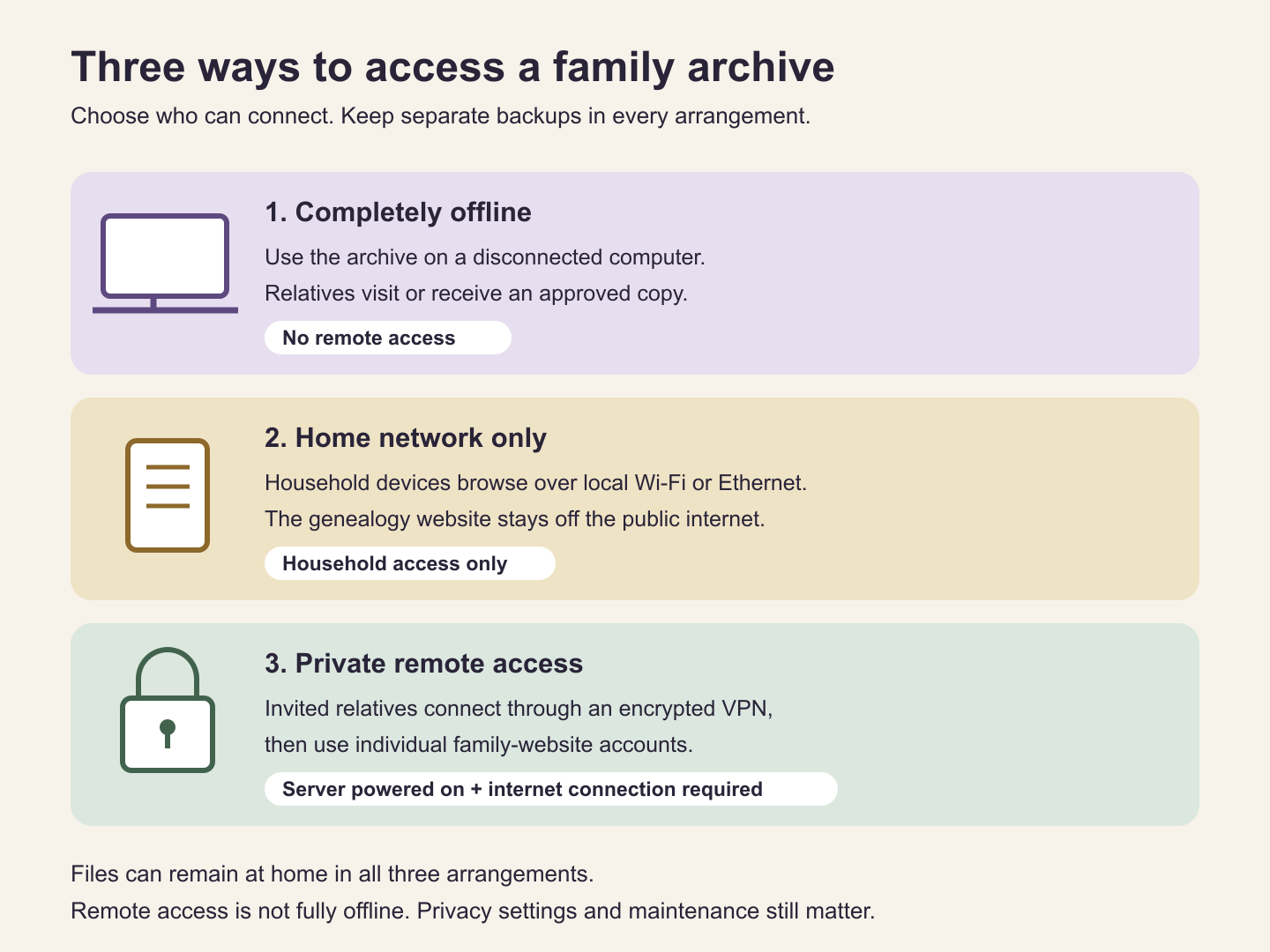
There are three practical access arrangements:
- Completely offline: use the archive on a disconnected computer. Relatives visit in person or receive an approved export. Remote login is unavailable.
- Home network only: household devices browse the server over local Wi-Fi or Ethernet. The genealogy service is not exposed to the public internet.
- Private remote access: invited relatives connect over an encrypted private network or VPN, then sign in to the genealogy application. The server must be powered on and connected to the internet while they use it.
For a MacFamilyTree static export, use permissions in the web server or private network to control access; do not expect TNG-style contributor accounts inside the exported site. Password protection is useful, but review how your chosen hosting arrangement protects the files themselves. A VPN such as WireGuard can support encrypted access, but someone must configure and maintain it. Restrict access to the required server and service instead of granting relatives access to the whole home network. For families without that expertise, obtain setup help or use a carefully reviewed managed option.
Give each person an individual account wherever the chosen server or collaboration system supports it, and the minimum permissions they need. Most relatives need browsing access; a smaller group may need to contribute or edit. TNG supports separate user rights, including restrictions for living or private people and permissions by family branch. Its features page describes those controls.
With webtrees, living people are private by default, but the tree itself is normally publicly visible subject to record-level rules. For a private tree, change “Show tree” to “show to members” and approve accounts deliberately. Review media and source privacy as well as names. The webtrees privacy guide explains the settings.
Test access while signed out and with a limited account. Check that private images cannot be opened through direct links. Revoke access when it is no longer needed. A login prevents casual browsing; it cannot stop an authorised reader from making copies.
A home server changes who holds the archive, but it does not make the archive immune to theft, disk failure, malware or mistakes. Keep the operating system and application updated, protect backups and avoid exposing a local development server directly to the internet. Disable optional external maps, analytics or other integrations if your aim is to avoid sending information to outside services. Review any remote-access provider’s dependencies separately.
Moving an existing tree: do not forget the photographs
Ancestry’s ordinary tree download is a text-based GEDCOM file. It does not contain the photograph and document files themselves, even though it may include references to media stored on Ancestry. Download permitted media separately, or use a supported transfer method that explicitly retrieves them. Then disconnect from the internet and check that your local archive still opens the images. Ancestry’s export guidance explains this limitation.
Keep collection titles and reference details alongside saved records, and respect restrictions on downloading and sharing. Ask living relatives before sharing sensitive stories, addresses or recordings. A factual event can still reveal information about another person who did not agree to publication.
A useful first weekend
Choose one family branch rather than importing everything at once. Enter ten people, scan five photographs, document three sources and record one short interview with permission. Make a backup, restore it and ask a relative to identify a photograph or correct a caption. You will learn more from that small complete archive than from a large untested import.
For Mac users, MacFamilyTree offers a practical starting point: a local master archive, useful charts and reports, and a website export for sharing. A suitable older Mac mini can hold and serve that archive, supported by dependable backups and occasional paid research access. Add a home website when relatives need to browse or contribute. The aim is to leave them an archive they can understand, trust and continue.